SEO Mega KIT PLUS
- Created: 25/07/2013
- latest Update: 09/10/2014
Feature list
- SEO Title Generator for all products
- Meta Keyword Generator for all products
- Meta Description Generator for all products
- SEO URL Generator for products, categories, manufacturers and information pages
- SEO Friendly URLs for all pages
-
Example 1
Standard URL:
/index.php?route=product/product&path=57&product_id=49
With SEO Mega KIT, before use SEO URLs Generator:
/c,57,tablets/p,49,samsung-galaxy-tab-10-1.html
With SEO Mega KIT, after use SEO URLs Generator:
/tablets/samsung-galaxy-tab-10-1.html
-
Example 2 - PAGINATION
Standard URL:
/index.php?route=product/manufacturer/info&manufacturer_id=8&sort=p.sort_order&order=ASC&page=2&limit=15
With SEO Mega KIT:
/apple;sort,p.sort_order,order,ASC,page,2,limit,15
-
Example 1
- Sitemap Generator
- Tag Generator for all products
- Canonical categories and brands
- Automatically create SEO Friendly names for images
- SEO Manager
- Auto Generator:
- SEO URL - when adding new product, category, manufacturer or information pages
- SEO Title - when adding new product
- Meta Keyword - when adding new product
- Meta Description - when adding new product
- Tags - when adding new product
- Clean with one click:
- SEO URLs for products, categories, manufacturers and information pages
- SEO Titles for all products
- SEO Heading (H1) Titles for all products
- Meta Keywords for all products
- Meta Description for all products
- Tags for all products
- Multilingual support
- Make friendly URLs for custom routes
- Translate friendly URLs (login, register, checkout, etc...) to another language
- Breadcrumb microdata description
- Product microdata description
- Multilingual home page meta items: Meta Title, Meta Description, Meta Keywords
- SEO Heading (H1) Title Generator for all products
- Custom Meta Title for products, categories, manufacturers and information pages
- Custom Heading (H1) Title for products, categories, manufacturers and information pages
Requirements
- vQmod version 2.4.0 or above (latest always recommended)
- Apache Module mod_rewrite
- PHP mb_string extension
Installation
- Upload all files inside the upload folder to your OpenCart folder, maintaining the directory structure within.
- Find the file ".htaccess" in main OpenCart folder. If you only have the file ".htaccess.txt", rename it to ".htaccess".
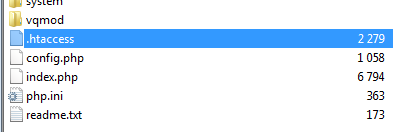
Inside the .htaccess file, find the following code:
RewriteRule ^download/(.*) /index.php?route=error/not_found [L]
On a new line after this, add the following:
RewriteRule ^image-smp/(.*) index.php?route=product/smp_image&name=$1 [L]
After modification, the file should look something like this:

-
We also recommend removing the
RewriteBase /from the file completely, however in some installations this doesn't work correctly. If this is the case, you will need to put the line back -
If you need to put the
RewriteBase /back and your store is in a subfolder, you'll need to edit theRewriteBase /toRewriteBase /yoursubfoldername/. For example, if your store is http://www.yourstore.com/shop/ you will need to haveRewriteBase /shop/on that line -
Go to: System > Users > User Groups

-
Click [Edit] for Top Administrator in the listing, or your administrator group name if you have a different one

-
Click [Select All] for Access Permission and Modify Permission

-
Click Save

-
Go to: Extensions > Modules

-
Click [Install] for SEO Mega KIT

-
Configure the parameters for extension SEO Images - e.g.:

and click the Clear button after this - If you want you can also set the parameters for the other extensions or leave the default
-
Click Save

- DONE !
Custom "admin" folder name
If the "admin" folder in your store has been changed for security reasons, you must update the following files:
-
In both
config.phpandadmin/config.phpadd:
 changing your_folder_name to the folder name that applies
-
In the following files, replace all occurrences of the string
admin/toyour_folder_name/- vqmod/xml/seo_mega_pack.xml
- vqmod/xml/seo_mega_pack_auto_generator.xml
- vqmod/xml/seo_mega_pack_can_cat.xml
- vqmod/xml/seo_mega_pack_store_settings.xml
- vqmod/xml/seo_mega_pack_support_old_product_tags.xml
- vqmod/xml/seo_mega_pack_titles_cmi.xml
- vqmod/xml/seo_mega_pack_titles_generator.xml
- vqmod/xml/seo_mega_pack_urls_generator.xml
- DONE !
First steps - What should I do after installing SMK ?
-
Configuration settings for SEO URLsBefore generating SEO URLs go to
Settings->URLsand configure settings below as you want them.


Additionally, you can add an extension to your URLs such as.html, which is automatically added when URL addresses for products and information pages are generated. In order to configure these, you need to go toExtensions(1)->SEO-URLs(2)and then click (3) and edit the extension(4)
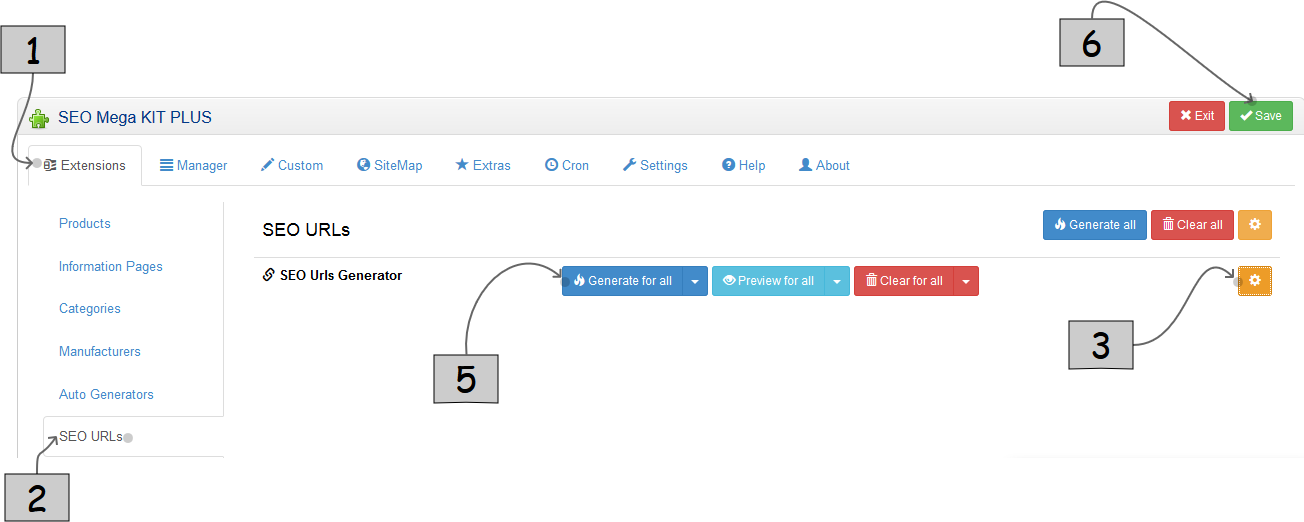

After clickingGenerate for all(5) you will see a new window with a table containing information about the items found in database that do not have generated SEO URLs addresses yet. To confirm their generation click

SEO settings for products, information pages, categories and manufacturers
-
Configuration settingsAfter choosing section
Extensions(1)->Products(2) / Information Pages / Categories / Manufacturersyou will see a list of available generators.

Clicking on the icon next to each(3) opens/closes the parameter box for that specific item(4)

Click(5) next to the various items to generate the individual items. You will then see a window with a table containing information about the items found in database without generated content. To confirm their generation click one more time.
When the configuration is finished, click (6) located in the upper right corner.
Auto Generators
-
Configuration settingsThis applies to items generated automatically as part of adding/editing your products, categories etc. Remember: If you've provided data for these items yourself in the editor, the item will not be overwritten by the auto generator. For example, after generator activation
Automatically create SEO URLs when adding or editing product, if you change product name during editing, the SEO URL won't change, except when you clear theSEO Keywordfrom it's previous value.
To automate this go toExtensions(1)->Auto Generators(2)and select the checkboxes(3) next to the items you want to be generated automatically and confirm with(4)

Automatic description generation
-
Configuration settingsChoosing
Extensions(1)->Descriptions(2)you will see the generators list for products, categories and manufacturers

The first step is to configure the templates that will be used to create descriptions. To do this, click on(3) and using the list of available parameters, enter the content of the template.

After configuring the parameters, click
Social Media
-
Configuration settingsTo enable the display of Social widgets go to
Extras(1)->Facebook/Google+ Widget(2)then clickEnable(3)and enter the URL of your social site.(4)

The Facebook design example The Google+ design example 

-
Facebook Open Graph / Twitter CardsFacebook Open Graph - This allows you to integrate websites with Facebook. It allows control over the presentation of your content in the social network, giving better their interaction with customers.
Twitter Cards - This is used to integrate your shop with Twitter, allowing you to preview the cart contents directly on this site before you click the link.
Enabling these options will add additional information to the source code stored on each product page, such as the current price, a link to the product images and information about the author.

After configuring the parameters, click
Google Webmaster Tools
-
Configuration settingsGoogle Webmaster Tools is a free web-based platform developed by Google for web administrators. It allows you to check the status of indexing of your site by Google and optimise the visibility of your pages.
To use the information available, you must first verify domain ownership. For this purpose choose theSettings(1)->Webmaster Tools(2)section. There you should give the webmaster tools verification code. More information on how to generateGoogle Site Verification valuecan be found at Webmaster Tools

Google Analytics
-
Configuration settingsGoogle Analytics is a free tool for statistics analysis of your website
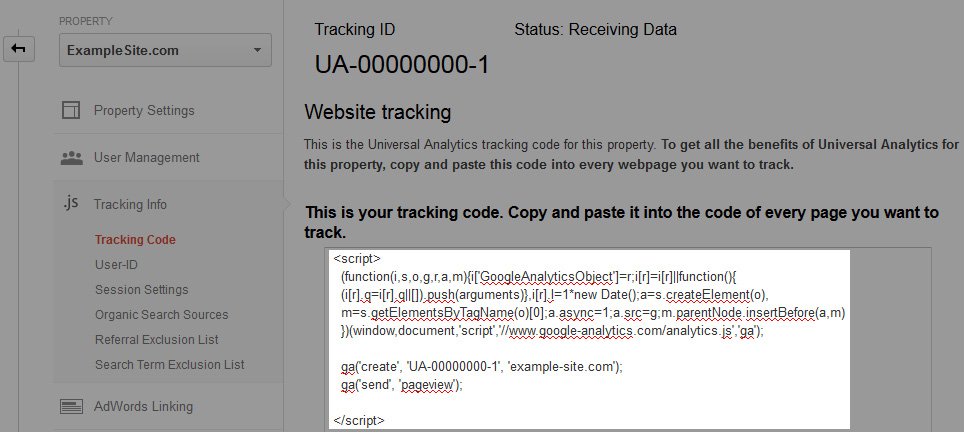
More information about how to generate the tracking code can be found at Google Analytics
To add a previously generated statistics code Google Analytics go toSettings(1)->Google Analytics(2)

and paste the entire contents of the box, as shown in the picture below:
After configuring the parameters, click
SiteMap
-
What is a sitemap?A sitemap is a list of URLs leading to all the pages in your online store. Linking search engines to your sitemap ensures they know of all of your web pages.
To generate a sitemap, go to theSiteMaptab at the top of SMK, then click the button located in the upper right corner.
When generation completes, you will see a list of generated files XML. URLs for all files whose name ends in.index.xmlshould be sent to the site WebmasterTools:
The others in the list (the ones not bold) are referenced in the index.xml files for the search engines to use and don't need submitting individually.

More information can be found here.
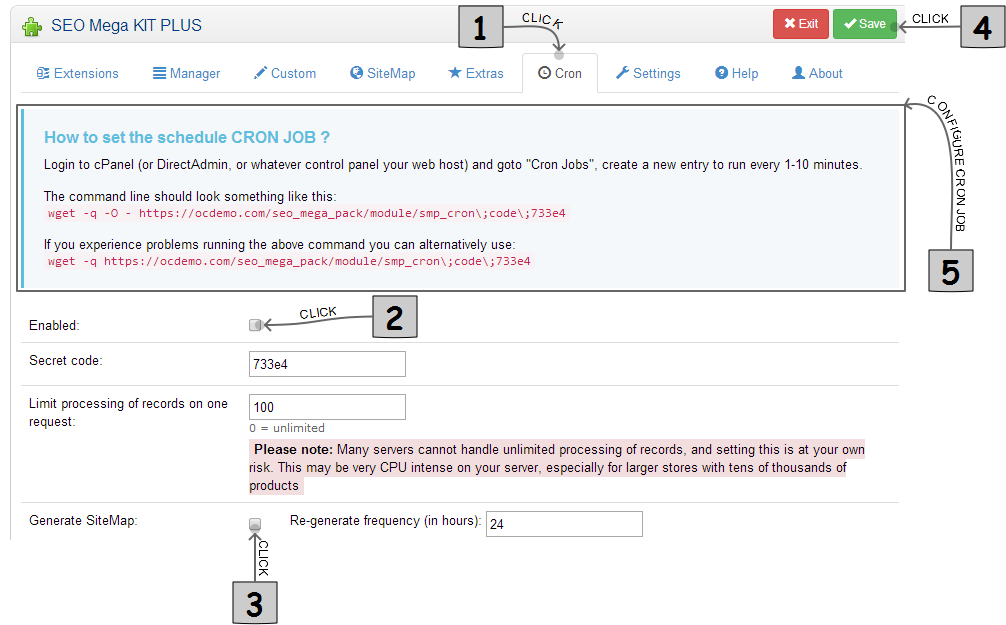
URLs will only need to be submitted to WebmasterTools once. From that moment Google will periodically download any data of these files at regular intervals. However, remember to update the information stored in the XML files. For this purpose use theCRONtab where you can configure the automatic generation of sitemaps:
FAQ
-
Why URLs are in the format
/c,57,tablets/p,49,samsung-galaxy-tab-10-1.htmlinstead of/tablets/samsung-galaxy-tab-10-1.html?The URLs are automatic, but you'll need to use the generator for URLs to have the format/tablets/samsung-galaxy-tab-10-1.html. To generate them:

-
How do I change the URL address from
http://yourstore.com/account/logintohttp://yourstore.com/login?This can be done as follows:

-
Why after installing SMK is my site much slower to load pages ?Caching is needed to speed up loading pages. You can activate it as follows:

Note the cache only stores information about URLs -
How do I enable short URLs for my products ?To change product URLs from:
http://yourstore.com/category-name-1/category-name-2/product-nameto:http://yourstore.com/product-nameyou should do the following:

Enabling the above function does not affect the operation of other functions such as SMK package descriptions extended (Rich snippets) or the navigation controls (breadcrumbs).
Skip Convert URLs
-
Configuration settingsAfter you install SMK, all URLs will be converted from format
http://yourstore.com/index.php?route=common/hometohttp://yourstore.com/common/home- This may cause problems with some extensions.
Going to the tabSettings->Skip Convert URLsallows you to configure the URLs that should remain in the default format.
For example, after adding expressionpayment/all URLs starting withhttp://yourstore.com/index.php?route=payment/ie.:
http://yourstore.com/index.php?route=payment/
http://yourstore.com/index.php?route=payment/cod
http://yourstore.com/index.php?route=payment/pp_pro, etc. will not be changed to the new format. This is needed for some payment gateways to avoid loss of data being sent back
Update
- Upload all files inside the upload folder to your OpenCart folder.
-
Go to: Extensions > Modules
-
Go to: [Edit] for SEO Mega KIT

-
DONE !

Store Meta Tags
-
Go to: System > Settings

- Click [Edit] for your store
-
Click [Store] tab

SEO Features
-
SEO Title

-
SEO Heading Title

Uninstall
-
If possible go to Extensions > SEO Mega KIT > [Edit] and click the button Clear for: SEO Urls Generator
-
Go to Extension > SEO Mega KIT and click [Uninstall]
- Login via FTP
- Remove files:
- vqmod/xml/seo_mega_pack.xml
- vqmod/xml/seo_mega_pack_auto_generator.xml
- vqmod/xml/seo_mega_pack_can_cat.xml
- vqmod/xml/seo_mega_pack_extras.xml
- vqmod/xml/seo_mega_pack_fb_og_tw_c.xml
- vqmod/xml/seo_mega_pack_microdata.xml
- vqmod/xml/seo_mega_pack_seo_image.xml
- vqmod/xml/seo_mega_pack_store_settings.xml
- vqmod/xml/seo_mega_pack_titles_cmi.xml
- vqmod/xml/seo_mega_pack_titles_generator.xml
- vqmod/xml/seo_mega_pack_urls_generator.xml
- admin/controller/module/seo-mega-pack - remove this folder
- admin/controller/module/seo_mega_pack.php
- admin/language/english/module/seo_mega_pack.php
- admin/view/template/module/seo_mega_pack.tpl
- admin/view/template/module/seo_mega_pack_about.tpl
- admin/view/template/module/seo_mega_pack_generate.tpl
- admin/view/template/module/seo_mega_pack_help.tpl
- admin/view/template/module/seo_mega_pack_manager.tpl
- catalog/controller/common/seo_mega_pack_pro_url.php
- catalog/controller/product/smp_image.php
- DONE !
Conclusion
Thank you so much for purchasing this extension. If you have any questions or problems, please raise a support ticket